
プロジェクト作成
MyBatisの動作確認用のため、Eclipseを使用しプロジェクトを作成する。
Eclipseは「Pleiades All in One」のリリース 2020-12を使用。
1. Eclipseプロジェクトを作成する
- メニュー[ファイル]->[新規 Springスターター・プロジェクト]
- 以下のように入力し「次へ」
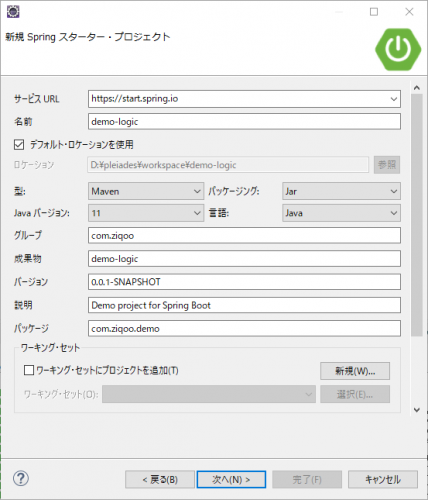
- 以下のように選択し「完了」
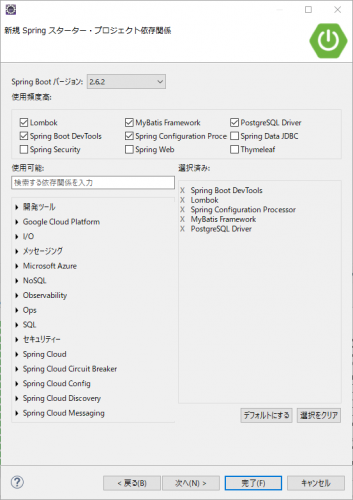
2. データーベースの設定
- src/main/resources/application.ymlを作成する。
- 接続先DBはここで作成したDBを使用する。
application.yml
spring:
    datasource:
        type:
        driver-class-name: org.postgresql.Driver
        url: jdbc:postgresql://localhost:5432/postgres
        username: postgres
        password: example
mybatis:
  configuration:
    map-underscore-to-camel-case: true
3. ライブラリ追加
動作確認にDbUnit、Bean間の値のコピーにModelMapperを使用するので、
pom.xmlのdependenciesタグ内に以下を追記する。
pom.xml
    <dependency>
      <groupId>com.github.springtestdbunit</groupId>
      <artifactId>spring-test-dbunit</artifactId>
      <version>1.3.0</version>
      <scope>test</scope>
    </dependency>
    <dependency>
      <groupId>org.dbunit</groupId>
      <artifactId>dbunit</artifactId>
      <version>2.7.2</version>
      <scope>test</scope>
    </dependency>
    <dependency>
      <groupId>org.modelmapper</groupId>
      <artifactId>modelmapper</artifactId>
      <version>2.4.4</version>
    </dependency>